FPGA myths: 13 common beliefs examined
Reading time: 7 minutes
What you thought about FPGAs, but is actually different
Somehow, FPGAs tend to attract contradictory beliefs. Some engineers will tell you FPGAs are low-power, others are certain they can never run on a battery. Some see them as prototyping toys, others as exotic, expensive specialist hardware. Interestingly, both sides are usually generalizing from the one corner of the FPGA world they happen to have seen.
That is the theme of the new article series we’re kicking off today. We collected the most persistent myths about FPGAs and took them apart one by one. A pattern emerges quickly: what people “know” about FPGAs depends heavily on where they come from: the GPU and server world, or the microcontroller world. And because FPGAs span such a large spectrum of sizes and applications, almost no absolute statement about them survives contact with reality.
In the rest of the series, we’ll explore some of the myths in more detail.
Let’s start busting.
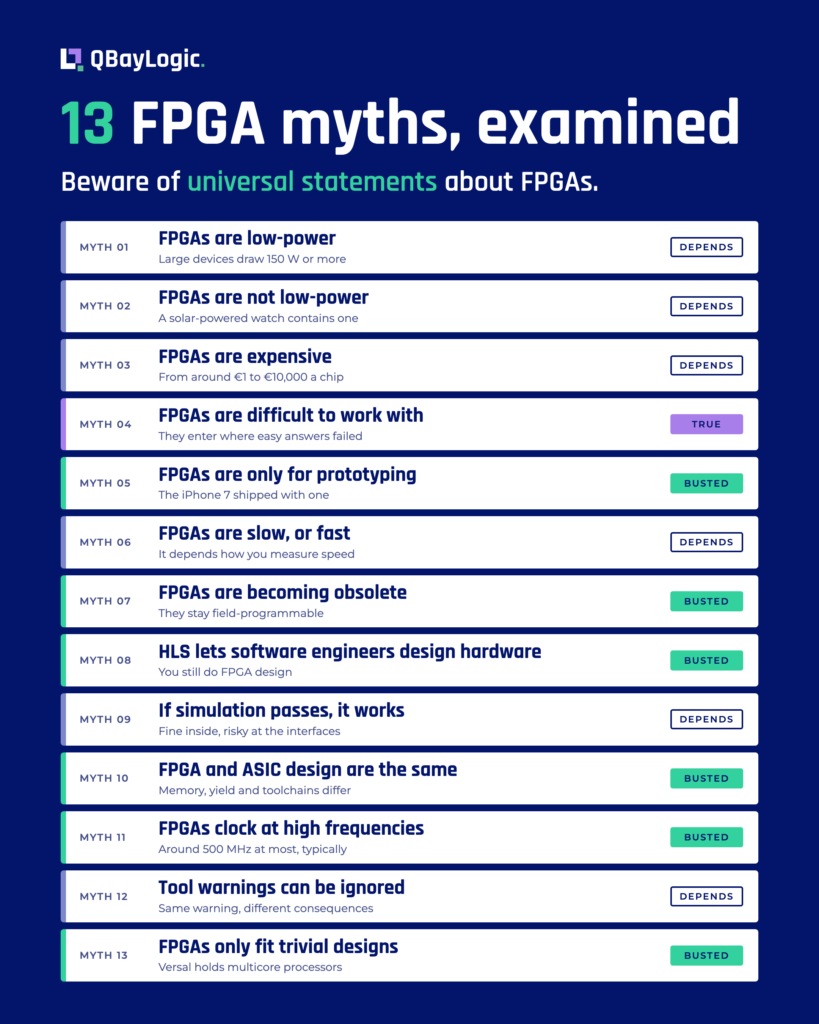
The 13 FPGA myths from this article at a glance. Each one is marked Busted, Depends or True.
Myth 1 & 2: “FPGAs are low-power” and “FPGAs are not low-power”
These two myths sit at opposite ends, and both are alive and well. Which one you believe depends on your background.
- Engineers who come from the GPU side tend to think of FPGAs as low-power devices. GPUs and servers burn enormous amounts of electricity, so by comparison an FPGA looks frugal. The reality: there are large, fire-breathing, water-cooled FPGAs in this world. The larger devices draw 150 watts or more, get seriously hot, and function in the same servers as the accelerators they supposedly undercut.
- Engineers who come from the microcontroller side believe the opposite: an FPGA guzzles power, and a battery-operated product with an FPGA inside simply cannot exist. Also wrong. Our favorite counterexample is a commercially available wristwatch, a regular watch, not a smartwatch, that contains an FPGA. The FPGA is there to receive GPS timestamps so the watch stays perfectly synchronized. The watch charges its battery with solar cells, and that battery needs replacing roughly once every 15 years. Not because it runs out, but because after 15 years the cell itself wears out. It doesn’t get much more low-power than that.
A related myth is that FPGAs are energy efficient. Here the honest answer is: no.
If you can build a chip entirely dedicated to your application, an ASIC, it will always be more energy-efficient than an FPGA. And if your application maps well onto a GPU, the GPU performs more calculations per joule than an FPGA does, provided you actually keep all those multipliers fed with data. The nuance is that a GPU has a power floor: it needs a substantial minimum, think tens of watts, before it does anything at all. Efficient per calculation, but you cannot go low. An FPGA can.
Myth 3: “FPGAs are expensive”
They certainly can be. High-end FPGAs go for prices in the range of €10,000 per chip. Then again, that is comparable to what high-end AI accelerators cost, so within that market segment it is not out of line.
But the market has changed. New players like Efinix and Gowin sell FPGAs at much lower price points. You still cannot buy an FPGA for a cent, the way you can buy the very cheapest microcontrollers, but you can buy one for a euro.
Two more things make the cost question less straightforward than it looks.
- First, FPGA pricing is remarkably opaque: you can buy the same FPGA at the same volume and still end up at a different price, depending on your conversation with the distributor or manufacturer and on how you intend to use the device.
- Second, and more fundamentally: the chip is only part of the cost. The development process is a real investment too, and at some point in every project there is a tipping point where another technology, a custom chip, for instance, becomes the more economical choice. Series size matters enormously here. Building ten devices is a very different equation from building ten thousand.
Which is why the practical rule is simple: you only reach for an FPGA when the requirements leave you no other choice. And then you hope it fits within the budget.
Myth 4: “FPGAs are difficult to work with”
Here is the uncomfortable one: this myth is largely true. But for a subtler reason than most people assume.
Yes, designing for an FPGA demands a different way of thinking. But consider when an FPGA enters a project: only after all the easier options have been ruled out. If a CPU could do the job, you would use a CPU. By the time an FPGA is on the table, you are, by definition, in a difficult application domain.
That means the difficulty of the problem and the difficulty of the technology intertwine. When people see FPGA projects run late and hear engineers call the work hard, part of what they are observing is not the FPGA at all. It is the fact that FPGAs are deployed precisely where the easy answers have already failed.
Myth 5: “FPGAs are only for prototyping”
The classic storyline: you prototype on an FPGA, and once you go to mass production, you switch to an ASIC. That path exists, but plenty of FPGAs have shipped inside finished, mass-market products.
The best example may be sitting in a drawer at your house. The iPhone 7 contained an FPGA. It drove the haptic home button: the circle on the glass that is not a mechanical button at all, but feels exactly like one when you press it, thanks to a vibration mechanism with a small weight inside. For a product generation, one of the highest-volume consumer devices on the planet shipped with an FPGA inside.
Myth 6: “FPGAs are slow”. Or are they “faster than CPUs and GPUs”?
The real question is: how do you measure speed?
If your application is completely serial, a CPU optimized for exactly that will beat an FPGA. If your application fits the architecture of a GPU, with many parallel calculations, the GPU will be faster. But if your workload is a mix — parts that run in parallel, combined with branching and local feedback loops — the picture flips.
Lots of if-then-else logic makes it very hard to keep all of a GPU’s cores busy. On an FPGA, you can keep all of that local: branching, feedback, small distributed memories right next to the logic that needs them. In that scenario, an FPGA’s throughput can be considerably higher than a GPU’s.
And then there is the other axis of “fast”: latency. If your system has to respond to an external event the moment it arrives, the FPGA wins almost every time. That is why FPGAs are used in high-frequency trading, in space, in laser applications and in communications: the response time is so low that you can hang the FPGA directly on the network.
The underlying reason is the FPGA’s defining property. A CPU or GPU has a fixed architecture, and you have to reshape your application to fit it. Which may simply never work well. On an FPGA, you shape the architecture to fit the application.
Myth 7: “FPGAs are becoming obsolete because ASICs and GPUs are better”
Are these platforms converging until the FPGA is squeezed out? We don’t think so.
The GPU will always be what it is: a single-instruction-multiple-threads (SIMT) machine organized around central memory, with layers of caches whose job is to hide how far away that memory really is. This means that, for real-time work that demands low latency and low jitter, the GPU remains a poor platform.
ASICs, meanwhile, are getting more expensive. Producing a small ASIC, or an ASIC on a newer technology node, requires an increasingly costly mask set. And because that mask set is so expensive, you spend more time and money on verification: you want to pay for those masks exactly once. All of that pushes the break-even volume, the point where an ASIC beats an FPGA, higher than it used to be.
And through all of this, the FPGA keeps the property that gave it its name: it stays field-programmable. A bug discovered in the field can still be fixed with an update.
Try that with a mask set.
Myth 8: “HLS means software engineers can design hardware”
High-level synthesis — designing FPGAs in a language like C or C++ that software engineers already know — is less a myth than a wish.
The language may be familiar, but the work is not. With HLS you may not be writing Verilog or VHDL, but you’re still doing FPGA design. You have to think about parallelism, you’re laying down a memory architecture, and you are hoping the tool makes the right decisions on your behalf. As long as the C code the tool produces hits the performance you need, all is well. But when it doesn’t, you need to understand why. That insight is precisely what defines a hardware engineer.
Myth 9: “If simulation passes, the FPGA will work”
This one, also, has its nuances. For the internals of your FPGA design, simulation is trustworthy: if a design works in simulation, it will generally work on the device.
The trouble starts where your design talks to the outside world. Because the outside world, quite stubbornly, refuses to behave like your model of it. Your model of the chips you communicate with may be subtly wrong. And some things you simply cannot simulate at all: the FPGA overheating because it sits in a badly ventilated enclosure. A power supply that isn’t quite good enough and produces glitches that turn into bizarre, hard-to-trace bugs.
None of which is an argument against simulating. Simulation catches a large share of your bugs early. Just please don’t confuse it with proof that the finished system works.
Myth 10: “FPGA and ASIC design principles are the same”
A tempting assumption, since FPGA and ASIC are so often discussed as two stages of the same journey: prototype on the FPGA, scale on the ASIC. That makes it a genuinely dangerous mistake, because the design disciplines differ in fundamental ways.
Take memory. On an FPGA, memory comes as block RAMs distributed across the fabric, combined into larger memories by the tool. They are always dual-port, and they are fast: open the datasheet and you’ll find you can drive them at nearly the same speed as the rest of the FPGA. On an ASIC, you choose your memory macros yourself: one port or two, one address at a time or two. Those choices directly affect your speed, and latency to memory becomes a far bigger bottleneck and a real design decision.
Then there is yield. A concept the FPGA designer never has to think about at all. An ASIC comes off a production line, and production lines produce defects. So ASIC design means designing for fabrication faults — duplicating structures, working with fuses, so that parts of the chip can be dead and the product still works. With an FPGA, you simply receive a validated chip that meets its spec.
The toolchains differ just as much. An ASIC flow runs from RTL all the way to GDSII (the blueprint that goes into the lithography machine) and the tools along that route can introduce errors at every step. So you run additional tools on top: logic equivalence checking to verify that each transformation left the chip’s behavior intact, and post-synthesis simulation, where the real delays of every gate are added to see whether the design still matches the ideal, zero-delay model you wrote. FPGA people just don’t do post-synthesis simulation. Because they have no need to.
Myth 11: “FPGAs can be clocked at high frequencies”
Unusual for this list: here the skeptics are right. Roughly. For a complex design, around 500 MHz is about the maximum you can typically achieve on an FPGA. In practice, FPGA projects often run at considerably lower frequencies. So if your mental image of a “fast chip” is a 4 GHz CPU, recalibrate. The FPGA’s speed comes from its architecture, not its clock.
Myth 12: “Warnings from tools can (or can’t) be ignored”
Both extremes of this myth circulate, and both are too absolute. The truth is that judging FPGA tool warnings is a fine art.
Part of the problem: reaching zero warnings is nearly impossible, because you rarely build everything yourself. The libraries and vendor IP you use come with piles of warnings baked in. Warnings you should, in principle, be able to ignore, since you cannot change that code anyway. Unfortunately, they keep scrolling past and catching your eye.
The warnings in your own code are where it gets interesting, because the very same warning can be harmless in one place and a genuine bug in another.
Take the warning that you are discarding bits. Sometimes that is exactly what you intended and discarding those bits is fine. And sometimes the same message means your simulations are incomplete, so you never saw what happens to the values that get truncated. Same warning, very different consequences. Telling one from the other takes experience.
Myth 13: “FPGAs can only accommodate trivial designs”
This one is a fossil. It dates from an era when the mental image of an FPGA was a digital signal processing accelerator: a row of filters, maybe a Fourier transform, and done.
Look at a modern system-on-chip FPGA — AMD’s Versal family, for instance — and the picture is very different. These devices contain full multicore processors, high-speed protocol interfaces, and AI accelerators (SIMD engines), alongside the programmable logic itself. You can wire all of it together and instantiate additional soft processors in the fabric on top.
Which brings us full circle to where this article began. FPGAs range from a chip in a solar-powered wristwatch to a water-cooled monster in a server rack, from one-euro parts to €10,000 flagships, from a simple filter to a complete system on a chip. Almost every myth on this list is a half-truth, accurate for one corner of that spectrum, and wrong for the rest.
The only universally safe statement about FPGAs may be this one: beware of universal statements about FPGAs.
13 persistent FPGA myths, examined one by one.
Frequently asked questions
Are FPGAs low-power?
It depends on the FPGA. Large devices draw 150 W or more, get hot and run water-cooled in the same servers as the accelerators they supposedly undercut. At the other end, a commercially available wristwatch contains an FPGA. Energy efficiency is a separate question: an ASIC is always more energy-efficient, and a GPU that is kept fed does more calculations per joule, but a GPU needs tens of watts before it does anything. An FPGA can go lower. For the full comparison, see FPGA vs CPU vs GPU.
Can an FPGA run on a battery?
Yes. A commercially available wristwatch, a regular watch and not a smartwatch, contains an FPGA that receives GPS timestamps to keep the watch synchronized. Solar cells charge its battery, which needs replacing roughly once every 15 years, because after that time the cell itself wears out. Large FPGAs draw 150 W or more, so whether an FPGA suits a battery-powered product depends on the device.
Are FPGAs difficult to work with?
Largely yes, for two reasons. First, FPGA design demands a different way of thinking. Second, an FPGA enters a project only after easier options, such as a CPU, have been ruled out, so the application is already difficult. Part of the difficulty people see belongs to the problem. Read what makes an FPGA project succeed and how our FPGA design process works.
Are FPGAs only used for prototyping?
No. Prototyping on an FPGA and switching to an ASIC for mass production is one path, but plenty of FPGAs have shipped inside finished products. The iPhone 7 contained an FPGA that drove the haptic home button, the circle on the glass that is not a mechanical button but feels like one. For a full product generation, one of the highest-volume consumer devices on the planet shipped with an FPGA inside. A small ASIC also needs an increasingly costly mask set, which raises the break-even volume. See FPGA vs ASIC.
If a design passes simulation, will the FPGA work?
For the design itself, generally yes. A design that works in simulation will generally work on the device. At the interfaces there is no guarantee: your model of the chips you communicate with may be subtly wrong, and some things cannot be simulated at all, such as an FPGA overheating in a badly ventilated enclosure or glitches from a weak power supply. Simulation catches a large share of bugs early, but it does not prove the finished system works. Our FPGA and ASIC verification service covers this gap.